
Your Stuff Deserves Better
Your listings on Google Shopping. Listing import. Bulk posting. Scheduled pickups. PayPal or Stripe. Plus a monthly seller dividend. ShopBroker 3.0 is live.


You list something. You wait. Someone messages you at midnight asking if you'll take half the price. Someone else says they'll come get it Saturday, then ghosts. Maybe someone actually shows up, and now you're standing in a parking lot handing your stuff to a stranger and hoping the cash is real.
There has to be a better way to sell your stuff locally in Canada.
We think there is. We spent the last few months building the local marketplace we wished existed. Listings that show up on Google Shopping the moment you post them. A way to bring everything you're already selling on other platforms over in minutes. And a monthly share of what the marketplace earns, paid back to the sellers who built it.
Introducing ShopBroker 3.0
Our biggest update yet. Your listings on Google Shopping. Listing import from Kijiji, Karrot, and Poshmark. Bulk posting for sellers with ten things to list. Pickups you schedule in one tap. PayPal or Stripe, your choice. And a monthly seller dividend that puts a share of platform fees back in active sellers' hands. Here's what's new.
Your Listings on Google Shopping. Automatically.
This might be the feature sellers care about most.
When you list an item on ShopBroker, it automatically appears on Google Shopping, one of the world's largest shopping search engines. Buyers searching for items like yours can find your listing without you lifting a finger.
There are no extra fees, no setup, and you don't need to know SEO. List it on ShopBroker, and Google does the rest.
As far as we know, we're the first Canadian local marketplace doing this automatically. Your items, in front of the world's largest shopping search engine, with zero extra steps from you.
Why this matters for sellers
You're not just listing to ShopBroker's audience anymore. You're listing to everyone who searches Google Shopping in Canada. One listing, millions of potential buyers.
Item as Described, or Your Money Back.
We know the biggest thing holding people back from trying a new marketplace is trust. Will I actually get what I paid for? What if the seller misrepresents the item?
That's why we built the ShopBroker Promise.
Here's how it works on courier-delivered orders: when your item arrives, you get a 24-hour inspection window to verify everything is as described. If it's not, you file a claim. We review it. If the item isn't as described, you get your money back. Learn how payment protection works.
No runaround. No "contact the seller and hope for the best." ShopBroker handles it.
Your payment isn't even captured until delivery is confirmed. If anything goes wrong before that, the hold on your card is released and you pay nothing.
The ShopBroker Promise
Item as described, or your money back. Courier-delivered orders on ShopBroker are protected by the ShopBroker Promise. See terms.
Schedule Pickups in One Tap.
Not every transaction needs a courier. Sometimes the buyer is two blocks away and just wants to come pick it up.
The old way: messages back and forth trying to find a time. "Saturday around 2?" "Actually can we do 4?" "Running late." "Are you still coming?" Someone ghosts. Everyone is annoyed.
Now sellers set their weekly availability once. Buyers see open 30-minute slots and pick one. The pickup time syncs to both calendars (Google, Outlook, or Yahoo) with one tap. No DMs required.
Sellers who connect Google Calendar get free/busy sync, so a slot is only available if you're actually free. We only see whether you're busy at a given time, never what the event is.
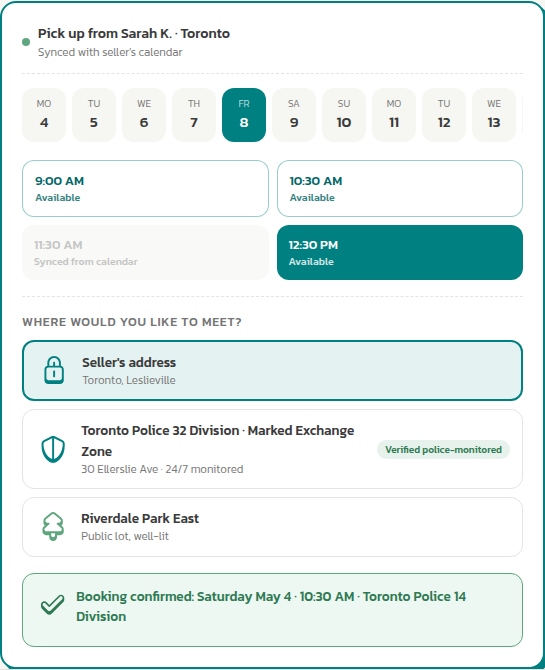
Pickup, scheduled.
Sellers set availability. Buyers pick a slot. Both calendars stay in sync. No more "Saturday around 2."
Bring Your Listings Over in Minutes.
If you're already selling on Kijiji, Karrot, or Poshmark, you don't have to start from scratch.
Paste your profile link. Pick which listings to bring over. We do the rest. Titles, descriptions, prices, categories, conditions, and photos all come across automatically, with AI auto-fill cleaning up anything that needs polish.
What used to take ten or fifteen minutes per listing now takes under two. Three platforms today, more coming soon.
You should never have to type the same listing twice.
List Multiple Items at Once.
Some sellers have one thing to move. Others have ten. The single-listing flow was never built for the second group.
Bulk posting changes that. Drop a folder of photos onto ShopBroker. The platform groups them into per-item batches, you review each one in seconds, and you submit them all at once. Up to 50 items in a 24-hour window.
Some go live immediately. Others save as drafts you can finish later. Either way, your shop fills up in the time it used to take to list a single item.
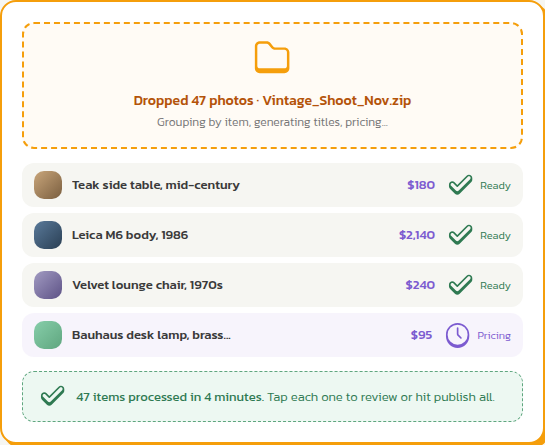
The math
Ten listings the old way: an hour and a half. Ten listings with bulk posting: ten minutes. Same shop, less typing.
Sellers Earn a Share.
Starting May 29, ShopBroker is doing something most marketplaces don't: paying active sellers a monthly share of what the platform actually makes.
Here's the why before the how. The sellers who actually move inventory are the reason this marketplace works at all. So every month, we take 10% of what we earned in service fees, pool it, and split it back across the active sellers, proportionally to how much each one sold.
If you sold 5% of everything that moved on the platform that month, you get 5% of the dividend pool.
The qualifier is simple: at least one completed sale and at least $200 in sales for the month. The payout shows up as a BrokerBucks credit on the 1st of the following month, and it reduces your future ShopBroker service fees.
In the early months, ShopBroker tops the pool up to a minimum floor (so the dividend stays meaningful while the marketplace is still small). Once the qualifier count grows past 100 sellers, the natural 10% does the work on its own.
As the marketplace grows, the pool grows with it. Your slice grows with your share of monthly sales. Read the full mechanics.
GMV in plain English
You'll see the term GMV in the dividend mechanics. GMV stands for "gross merchandise value." It's just the total dollar value of everything sold across the platform in a month. Your share of the dividend pool is your share of GMV.
Get Paid Your Way. PayPal or Stripe.
Until now, sellers got paid through Stripe. That's still the default, and it's still excellent.
But you asked for choice, and we listened. ShopBroker now supports PayPal Commerce Platform alongside Stripe. When you sign up to sell, you pick which one works for you. You can switch anytime.
For buyers, this means more ways to pay at checkout: credit card, debit card, or PayPal balance. For sellers, it means getting paid the way you prefer, with a unified payments dashboard that shows every transaction and payout from both providers in one place.
A Smarter Local Marketplace.
Beyond the headline features, we've improved nearly every part of the platform:
- Get anywhere in one tap. New desktop menus and a mobile tab bar put Home, Browse, Sell, Messages, and Profile within thumb reach.
- Find what you're looking for, even with typos. Search now understands misspellings, suggests results as you type, and surfaces items in related categories.
- See more of what you're buying. Bigger product images, video support in listings, and the ShopBroker Promise badge on every listing page.
- Track your money in one place. A new payments dashboard shows every transaction and payout in one view, across both PayPal and Stripe.
- Get a better price with AI. Price Genius now researches current retail prices and adjusts for age and condition, so your listing price is competitive from the start.
- Simpler delivery. Same-day GTA courier delivery via Trexity, simplified to one option: on-demand pickup, same-day arrival. Items up to 35 lbs.
- Clearer emails. Order confirmations, delivery updates, and notifications redesigned so you can read them on your phone and know exactly what happened.
- Settings without the hassle. 8 settings pages condensed to 3, edit one field at a time.
The Old Way vs. ShopBroker.
Here's what changes when you sell locally on ShopBroker:
| The old way | ShopBroker | |
|---|---|---|
| Payment protection | No | Authorization hold, no charge until delivery |
| Buyer guarantee | No | ShopBroker Promise: item as described, or your money back |
| Google Shopping | No | Your listings appear automatically |
| Payment options | Cash, e-transfer | Credit card, debit card, PayPal balance, processed by Stripe or PayPal |
| Bringing existing listings | Manual re-entry | Paste a link, listings come across automatically |
| Posting many items | One at a time | Up to 50 in a single batch |
| Same-day delivery | In-person meetup only | Verified courier across the GTA |
| AI pricing | Manual research | Price Genius suggests the right price |
| Pickup scheduling | "Saturday at some point" | Pick a time slot, syncs to your calendar |
| Earning back | Nothing | Monthly Seller Dividend: a share of platform fees |
The Short Version.
List your item. It shows up on Google Shopping automatically. Bring everything you're already selling elsewhere over in minutes. List ten things at once if you've got them. Buyers pick a pickup time without DMs, or a courier delivers same-day. Get paid via PayPal or Stripe, your choice. And every month you sell actively, you get a share of what the marketplace earns.
That's it. That's the platform.
Ready to try it?
You've got the tools. Your listings on Google Shopping. Listing import in minutes. Bulk posting for sellers with more than one thing to move. Pickup scheduling that just works. PayPal or Stripe at checkout. A monthly share of platform fees. And the ShopBroker Promise behind every transaction. List your first item and see for yourself.
Item as described, or your money back.
Frequently Asked Questions.
Is ShopBroker safer than traditional classifieds?
Courier-delivered orders on ShopBroker include payment protection through the ShopBroker Promise. Your payment is not captured until delivery is confirmed. If an item is not as described, you can file a claim within the 24-hour inspection window after delivery. Learn more about how payment protection works.
Does ShopBroker list items on Google Shopping?
Yes. When you list an item on ShopBroker, it automatically appears on Google Shopping at no extra cost. This gives your listing exposure to millions of Google shoppers in Canada.
Can I bring my listings from other platforms?
Yes. Paste your profile link from Kijiji, Karrot, or Poshmark and your listings come across in minutes. AI fills in titles, descriptions, prices, categories, and photos. Pick which ones to bring over. Skip the rest. More platforms are on the way.
Can I list multiple items at once?
Yes. Drop a folder of photos and ShopBroker groups them into per-item batches. You review each in seconds, then submit them all at once. Up to 50 items in a 24-hour window.
What payment methods does ShopBroker accept?
ShopBroker accepts credit cards, debit cards, and PayPal balance. Sellers choose between Stripe and PayPal Commerce Platform when they sign up, and can switch anytime. Buyers see the full set of options at checkout.
How does the Monthly Seller Dividend work?
Each month, ShopBroker pools 10% of the platform service fees we billed for completed sales. The pool is split across active sellers in proportion to their share of GMV (the total value of items sold) for the month. The qualifier is one completed sale and at least $200 in monthly sales. The dividend lands as a BrokerBucks credit on the 1st of the following month and reduces your future service fees. In the early months, ShopBroker tops the pool up to a minimum floor so the dividend stays meaningful while the marketplace is still small. Starts May 29, 2026. Full mechanics here.
Can I schedule a pickup time with the seller?
Yes. Sellers set their weekly availability so buyers can pick from open 30-minute slots and add the pickup to both calendars (Google, Outlook, or Yahoo) with one tap. Sellers who connect Google Calendar get free/busy sync, so available slots automatically reflect their real schedule.
Does ShopBroker deliver items?
Yes. ShopBroker offers same-day courier delivery via Trexity in Toronto and across the GTA. Items up to 35 lbs qualify. The buyer pays for delivery at checkout, and a verified courier picks up and delivers the item the same day.
How much does it cost to sell on ShopBroker?
It is free to list. ShopBroker charges a small fee when an item sells. Active sellers also earn a monthly share of those fees back through the Monthly Seller Dividend. Browse the marketplace to see what others are listing.
Android Beta is Open. iOS is Next.
The ShopBroker app is in active beta on Android, with iOS coming soon after. We're inviting our Community Digest subscribers first when public beta opens. If you want to be at the front of that line, subscribe to the digest and you'll get the invite the day public beta opens.
P.S. With 3.0 launching, our Terms of Service and Privacy Policy are getting an update on May 29, 2026. The short version: we're formalizing the Monthly Seller Dividend and simplifying our seller benefits structure. We also updated our registered office address. Full details below.
A note about our Terms of Service and Privacy Policy
With all these new features, we've updated our Terms of Service and Privacy Policy effective May 29, 2026.
Terms of Service v3.4 introduces the Monthly Seller Dividend (10% of platform service fees, paid monthly as BrokerBucks based on each seller's share of GMV), simplifies our renewable tier discount from 4 tiers to 3 (Silver, Gold, Platinum), pauses Community Stars and BrokerBucks as standalone earning programs (existing balances stay yours, no expiry), and codifies the ShopBroker Promise and Google Shopping integration.
Privacy Policy v3.5 adds Xero as a disclosed processor in §3.3, adds dividend records retention to §6, and continues the server-side measurement disclosures introduced in §3.8.
Updated registered office: 1180-375 University Ave, Toronto, ON M5G 2J5. (We moved.)
You'll see in-app banners and a notice email with the change summary 30 days before the effective date. As always, you can review the full Terms and Privacy Policy at the links above. If you have questions, reach out through Intercom chat on the site.